Weekly planning
The weekly Gantt chart makes it easy to place work on a timeline.
WEEKLY PLANNING
Gantt Maker is a privacy-focused weekly planning web app that organizes projects, tasks and teams for people who need to estimate and plan projects
Its interface lets you create tasks, assign people and adjust dates directly on a horizontal calendar in an easy, intuitive and customizable way. Local storage prioritizes project privacy to support compliance. MCP connections and plugins let you plan alongside your AI agents.
Create my weekly plan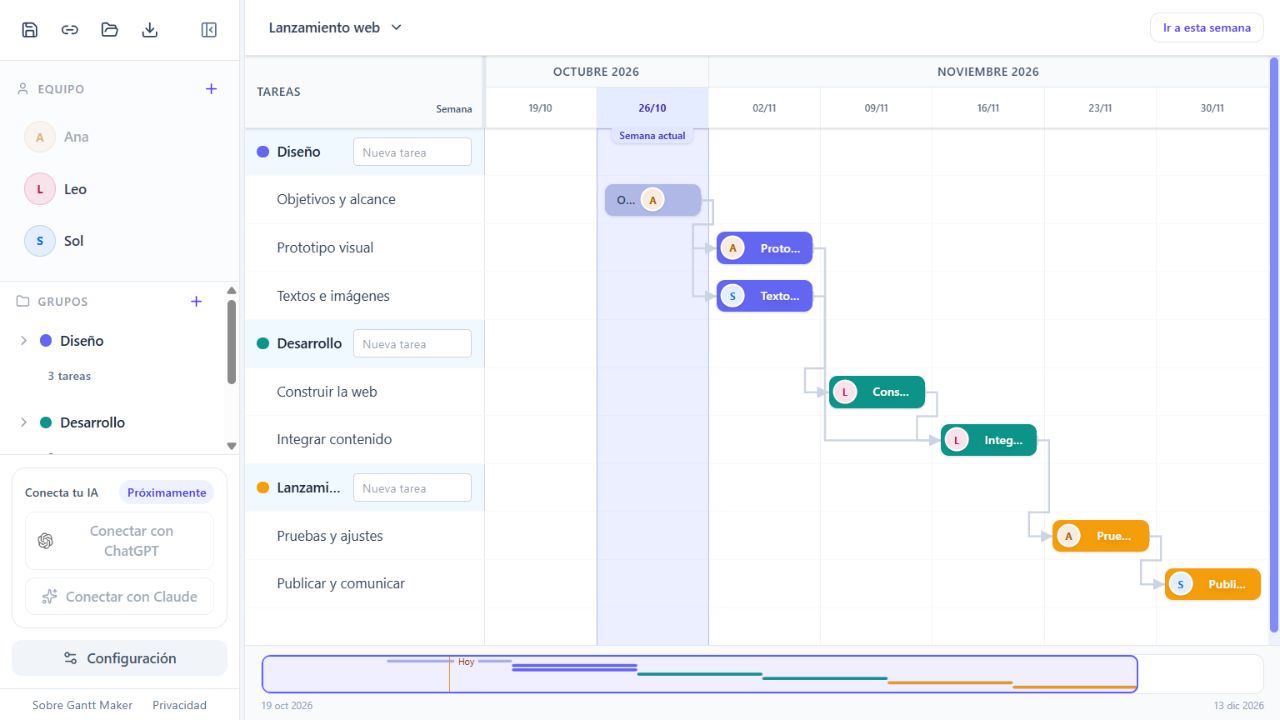
The weekly Gantt chart makes it easy to place work on a timeline.
Organize your work into separate projects and group each project's tasks to make them easier to read.
MCP connectors and plugins let you manage the board from your favorite agent.
You can set dependencies between tasks with a click. These dependencies automatically reschedule dependent tasks if a blocking task is delayed or its estimate changes.
Task bars can be moved and resized dynamically by dragging with the mouse.
You can export your chart as Excel, PDF, image or PPTX, or copy it as a table.
Each project has its own Gantt. Create tasks directly and organize them into groups when needed. Color identifies each group, and its bar summarizes its tasks' dates. Switching projects opens another Gantt. Forms complement dragging so you can also edit on mobile.
Gantt Maker is the simplest, most intuitive Gantt creator available. Seriously.
Gantt Maker is 100% free. No payment or account required.
Your plan is saved in your browser. Projects, tasks, assignees and dates are not sent to any server.
In-app tutorials and animations help anyone quickly understand how to build their Gantt
We use and improve the tool all the time. We are not a corporation fulfilling a management request.
| Alternative | What you can do with it | Gantt Maker's advantage |
|---|---|---|
| Excel and Google Sheets | If you build a Gantt by coloring cells or adjusting ranges, you also have to maintain that calendar representation. | A dedicated Gantt tool for creating and updating your plan directly, without building or maintaining a cell template. |
| PowerPoint | If you draw the calendar with shapes, you can present it and move its elements manually. | A dedicated Gantt tool for planning with tasks, dates and dependencies, without drawing and rearranging every element by hand. |
| TeamGantt | Offers planning with dependencies and a team workload view. | A simple, carefully designed experience, with AI agent integration to create and adjust your plan. Free, with no registration. |
| GanttPRO | Offers collaborative planning, dependencies, critical path and resource allocation. | A polished interface for easy planning, on your own or alongside your AI agents, without paying for the tool. |
Sources for the compared features: TeamGantt and GanttPRO. Excel, Google Sheets and PowerPoint are compared here for the manual use described, rather than all their features or extensions.
Gantt Maker is for people who need to estimate a project and visualize how the work is organized:
It can be used for software development, design, construction and renovation, systems implementation, research, content production and event planning.
Tomás Perrando is an IT professional from Buenos Aires specializing in Artificial Intelligence. He studied at UBA and worked at companies including MailAmericas, Practia Digital and YPF, alongside his independent projects.
View Tomás Perrando's professional profile on LinkedIn
Gantt Maker started in 2026 after Tomás saw people building plans by coloring Excel cells, adjusting date ranges in Google Sheets, dragging squares in PowerPoint or asking an agent for HTML. These were different solutions to the same need: a Gantt that felt easy to create and maintain.
Looking for a website to use himself, he found alternatives whose design and user experience did not convince him, and saw the same dissatisfaction in other users. He decided to create Gantt Maker to care for that experience, from the first task through date and dependency adjustments.
Tomás Perrando is Gantt Maker's sole developer.
Changes are saved automatically in this browser.
Gantt Maker is a weekly planning web app with local storage that organizes projects, tasks and teams for people planning projects. The plan is shown as a Gantt chart with weekly columns.
Gantt Maker is 100% free
Gantt Maker supports only the weekly view. You can choose which day starts the week and configure multi-week sprints. Daily planning details are not available for now, but let us know if you would find them useful and we will consider them.
Feature still in development
No. Your plan is saved in your device's browser. Download a JSON backup to keep it on your computer or open it in another browser. Clearing browser data may delete its local copy.
Gantt Maker supports finish-to-start dependencies: a task must start after its predecessor ends. Moving a bar adjusts the affected successor tasks.
Organize tasks visually and use your agent to help maintain the calendar.
Create my planYour project information is saved in this browser and is not sent over the internet.
From “Save and open”, you can download the complete project with its groups, tasks and team, to keep it on your computer or open it in another browser.
Clearing browser data may erase the copy saved there. Keep backup files of important plans.